FAQs



Digital Ticketing Tutorial
Season Membership FAQs
Mobile / Digital Ticketing
How do I access and save my digital season tickets?
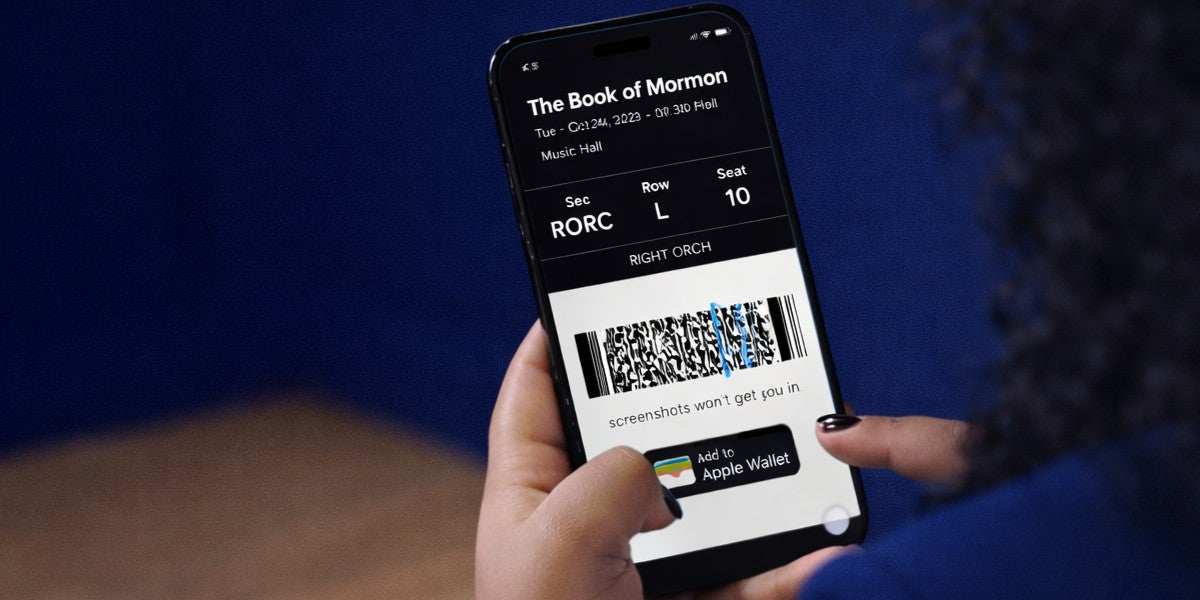
Your tickets can be saved to your phone and scanned on your mobile device at the venue. After making your purchase online, you will receive two emails – one is your receipt, and one is the tickets. Follow the instructions in the email to ensure you have saved a readable ticket with you on the day of the event. When/if adding your tickets to your digital wallet, look for the “Add All” button that adds ALL of the tickets in your order to your digital wallet at once.
Can I print my ticket or use a screenshot?
Yes, Broadway in Melbourne allows you the option to select 'Print from Home' when purchasing your tickets. After making your purchase online, you will receive two emails – one is your receipt, and one is the tickets to be printed. You will receive the printable tickets between 2 and 7 business days before the event. Follow the instructions in the email to ensure you bring a readable ticket with you on the day of the even
Can I show my tickets on a tablet?
No, the screen is too large and the scanners are unable to scan those barcodes.
I go with friends/family members, how do I get their tickets to them and how do they claim their tickets?
You can either transfer your recipient's tickets to them or, you may contact the venue Box Office and have their tickets place at Will Call for them to claim on the day of their performance. You can reach the Box Office at 321-242-2219 anytime Monday/Wednesday/Friday, 12 noon-6pm EST.
Do I need to present all the tickets at once?
Yes. All patrons should enter at the same time using the tickets displayed via your online account on your mobile device. If members of your party are arriving separately, then you will need to transfer the ticket they will be using for entry to them or you will need to request those ticket be placed at Will Call. Please reach out to the venue Box Office for assistance.
If I have digital tickets, can I still get them printed at the Box Office?
No. If you elected to have your tickets delivered digitally, tickets retrieved from your online account will now be considered printed. If you cannot find your confirmation email with your tickets, please reach out to the Box Office for assistance.
Why can’t I see my tickets in my account?
If you are having issues viewing or accessing your tickets, please contact the venue Box Office at 321-242-2219 anytime Monday/Wednesday/Friday, 12 noon-6pm EST for assistance.
What if my digital ticket isn’t on my phone at the theatre?
Please visit the Box Office and they will assist you.
PURCHASING
How can I purchase accessible seating?
Accessible seating can be purchased either online or by contacting the venue Box Office at 321-242-2219 anytime Monday/Wednesday/Friday, 12 noon-6pm EST. You may also contact the American Theatre Guild’s office online or by calling 816.421.7500 anytime Monday-Friday, 10am-4pm CT.
Do I have to pay for the entire season at once?
No. Another benefit to being a season member is that you can elect to pay for your season membership with easy payments. Renew/join online or by phone before the deadline and request the "Payment Plan" option as you send in the appropriate payment.
Can my family or friends use my priority ticket benefits?
Yes, you can share this benefit with friends and family, however, the request must come from the account holder or designated person(s) on the account given permission by the account holder and notated in the Season Member's account.
Purchasing additional tickets online.
Season Members can purchase additional tickets through the venue Box Office at 321-242-2219 anytime Monday/Wednesday/Friday, 12 noon-6pm EST.
MANAGING TICKETS
I would like to change my season membership seats.
Only purchase of your previous seats are available at the time of Season Renewals. Once we have finalized the details of all the returning members and the season membership buying window has closed, then you will be notified with an “online upgrade time” where you can login to your account and choose from available seating. Keep in mind, seating options from one year to the next all depend on current season members renewing. If every patron in front of you renews, you will not have the opportunity to move forward. Renewals in the theaters’ premium areas are very high, so it is more difficult to make changes in those areas.
How do I exchange my tickets? I cannot attend one of my performance due to a conflict.
Season Members can exchange tickets for another performance of the same production. Please note - while we make every effort to place you into comparable seating for exchanges, this cannot be guaranteed.
TWO WAYS TO EXCHANGE*:
-
Conveniently online by logging into your American Theatre Guild account (step by step instructions under ‘How do I exchange my seats online’).
-
By calling us at 816-421-7500 anytime Monday-Friday, 10am-4pm CST.
*Exchanges must be made no later than 72 hours in advance of the show and are subject to availability at the time of the exchange. Some restrictions may apply. Touring companies may limit the number of swaps/exchanges. No refunds if you swap/exchange into a less expensive performance or section. The difference in price must be paid if swapping/exchanging into a higher priced performance or seating location. Tickets are subject to additional fees. A $5 per ticket fee applies for all swap/exchange transactions. Upgrade charges may apply. Swaps are available later in the summer. Additional ticket limits may vary by production. Exchange policies subject to contractual terms with touring companies.
How do I exchange my seats online?
-
To exchange the night of a season show, or to swap* into a season add-on, log into your American Theatre Guild account and then click ‘Manage Tickets’.
-
Select the event and the seats you want to exchange. This will pull up a list of the shows you can exchange/swap into.
-
Select the event you want to exchange into.
-
A seating chart for that event will appear. Highlight your desired sections and the available seats will appear.
-
Select the seat(s) you want by clicking on them.
-
You will get a summary of your old seats and your new seats. Confirm this is what you want to do.
-
Accept the Terms and Conditions and click ‘Submit’.
-
You will receive an email confirmation. Please be sure to confirm your order details.
*SWAPS AND EXCHANGES: Limit one swap per season ticket. Swaps may be limited after priority swap period. Exchanges must be made at least 72 hours in advance of the show and are subject to availability at the time of the exchange. Some restrictions may apply. Touring companies may limit the number of swaps/exchanges. No refunds if you swap/exchange into a less expensive performance or section. The difference in price must be paid if swapping/exchanging into a higher priced performance or seating location. Tickets are subject to additional fees. A $5 per ticket fee applies for all swap/exchange transactions. Swaps are available later this year. We recommend you swap early, as a limited number of swaps may be permitted per show. Upgrade charges may apply.
How do I purchase additional tickets online?
-
To buy tickets to the season add-on or additional tickets to a season show, first, log into your American Theatre Guild account and then click ‘Buy Tickets’.
-
Click ‘Select’ for the event you want to purchase. A seating chart of the theatre will appear.
-
At top left, you can add (+) or subtract (-) the number of seats you want to purchase.
-
When you highlight a section of the theater, the available seats will appear.
-
Select the seat(s) you want by clicking on them - this will put them in your shopping cart.
-
Hit ‘Continue’ and Proceed to Checkout.
-
If you want additional tickets, click ‘Continue Shopping’.
-
Confirm your contact information, make changes if needed. Click ‘Continue’.
-
Select Payment method and enter card info. Note: If your account has a credit, you can choose to apply it towards payment amount.
-
Accept the Terms and Conditions and click ‘Submit Order’.
-
You will receive an email confirmation. Please be sure to confirm your order details.
I have already seen one of the shows in my season. What are my options if I don't want to see it again?
Although we are unable to offer refunds on shows previously seen, we may be able to help. Season members may swap* out of one show in the season package and into a Season Add-On shows (if they are available). Please contact us with any questions.
*Limit one swap per season ticket. Swaps may be limited after priority swap period. Some restrictions may apply. Touring companies may limit the number of swaps. No refunds if you swap into a less expensive performance or section. The difference in price must be paid if swapping into a higher priced performance or seating location. Tickets are subject to additional fees. A $5 per ticket fee applies for all swap transactions. Upgrade charges may apply. Watch your email for your swap availability window. Additional ticket limits may vary by production.
ACCOUNT MANAGER
How to change your address.
Please reach out to Broadway in Melbourne at 321-242-2219 anytime Monday/Wednesday/Friday, 12 noon-6pm EST and a representative will be happy to assist you in updating your account.
I can no longer attend the series and would like to give my account to a friend. Is that possible?
Yes, it is possible to give your seats to a friend. Contact Broadway in Melbourne at 321-242-2219 anytime Monday/Wednesday/Friday, 12 noon-6pm EST and a representative will be happy to assist you.
Season ticket cancellations and refunds.
Please contact Broadway in Melbourne at 321-242-2219 anytime Monday/Wednesday/Friday, 12 noon-6pm EST to inquire about cancellation options.
I am unable to attend this year, but would like to retain my seats for the following year. What can I do?
We are unable to hold your seats without payment in full. If accounts are not paid or partially paid on a payment plan by the renewal deadline, seats are released. If you choose to release your seats and then return in a future season, please note that your account would be considered as a new member and seated with the best available locations at that time.
Creating individual accounts from shared memberships.
Splitting season accounts can be done if the CURRENT ACCOUNT HOLDER makes this request to our office BEFORE tickets are delivered. Contact Broadway in Melbourne at 321-242-2219 anytime Monday/Wednesday/Friday, 12 noon-6pm EST and a representative will be happy to assist you.
Season Subscription Terms and Conditions
Season Subscriptions, and all Tickets and Additional Tickets purchased under any Subscription, are subject to the American Theatre Guild Standard Season Subscription Terms and Conditions posted on our website at https://www.americantheatreguild.com/terms-of-use. By purchasing a Season Subscription, you agree to such Terms and Conditions. Prices, shows, artists, dates and times are subject to change at any time without notice.
INDIVIDUAL TICKET BUYER FAQS
MOBILE/DIGITAL TICKETING
Accessing Mobile/Digital Tickets.
Your tickets will be delivered to you in the manner you select during the purchasing process. Most ticketholders have received either print-at-home tickets or mobile tickets. After making your purchase online, you receive an emailed receipt. Print-at-home tickets will be emailed 24-48 hours before the show. Follow the instructions in the email to ensure you bring a readable ticket with you.
-
Mail
Tickets can be mailed to you via USPS. -
Will-Call
The will-call window is open one hour prior to performances to collect your tickets the day of the show. -
Print At Home
Your tickets can be printed at home on your desktop printer. After making your purchase online, you will receive two emails – one is your receipt, and one is the tickets to be printed. Follow the instructions in the email to ensure you bring a readable ticket with you on the day of the event. -
Mobile Tickets
Your tickets can be saved to your phone and scanned on your mobile device at the venue. After making your purchase online, you will receive two emails – one is your receipt, and one is the tickets. Follow the instructions in the email to ensure you have saved a readable ticket with you on the day of the event.
Is printing or screenshotting digital tickets accepted?
Yes, Broadway in Melbourne allows you the option to select 'Print from Home' when purchasing your tickets. After making your purchase online, you will receive two emails – one is your receipt, and one is the tickets to be printed. You will receive the printable tickets between 2 and 7 business days before the event. Follow the instructions in the email to ensure you bring a readable ticket with you on the day of the even
Can I show my tickets on a tablet?
No, the screen is too large and the scanners are unable to scan those barcodes.
What if my digital ticket isn’t on my phone at the theatre?
Please visit the Box Office and they will assist you.
PURCHASING
Accessible Seating.
You may order tickets over the phone by calling 321-242-2219 during the ticket office hours of operation (Monday-Friday, 12 noon – 6pm, local time). To purchase tickets online, including outside of ticket office business hours, visit http://www.kingcenter.com/schedule-of-events. The King Center accepts Visa, MasterCard, Discover, and American Express credit cards for phone purchases.
Avoiding third-party ticket purchases.
The King Center website is the only authorized online ticket seller for our performances. Save money and protect yourself from scams and scalpers by only purchasing tickets through our website or in person at our ticket office.
Getting help with your ticket purchase.
For any questions regarding an individual ticket purchase, contact us.
GROUP TICKETS FAQS
How many tickets qualify as a group?
Group ticketing is available for patrons purchasing 10 or more tickets to an individual event.
How can I purchase accessible seating?
Accessible seating can be requested when submitting your Group Ticket Request Form. Please note any accommodation requests under the ADDITIONAL INFO OR REQUESTS section.
Are there any benefits to purchasing group tickets?
Yes! Visit our Group Tickets Page to view group ticket benefits.
How can I confirm that I am not buying tickets from a third party site?
The King Center website is the only authorized online ticket seller for our Broadway in Melbourne performances. Save money and protect yourself from scams and scalpers by only purchasing tickets through our website or in person at our ticket office.
I would like to purchase a large number of ticket for my company event or charitable organization? How do I do that?
Parties of 10 or more for an individual show can be purchased through our group sales representative; please fill out our Group Ticket Request Form to request group tickets.
PRIVACY POLICY
Learn more about our Privacy Policy.
Review our Privacy Policy.